
Play with FriendsLet others join your server — same wifi or across the internet
Your realm isn't just yours — any WoW 3.3.5a client can join it. There are two cases: a friend in the same house/network (easy), or a friend over the internet (two extra steps: telling the world your address, and opening two doors in your router). Ten minutes, no networking degree required.
What you need first: your server running; your friend with a clean WoW 3.3.5a (build 12340) client; and an account for them (created in a minute, step 5).
Case A — friend over the internet
Step 1 — Put your public address into the realm list.
The realm entry in the database tells connecting clients WHERE the world server lives. Out of the box it says
127.0.0.1 — that means “this same PC”, which works for you but sends your friend
to their own PC. Change the public address to YOUR public IP (find it by googling “what is my IP”).
- ✓With the App (supporters): Realm Tuning → Realm tab → set Public address to your public IP. Leave LAN address as it is (
127.0.0.1) and the port at8085. Click Save realm. Applies when players reconnect — no server restart needed.
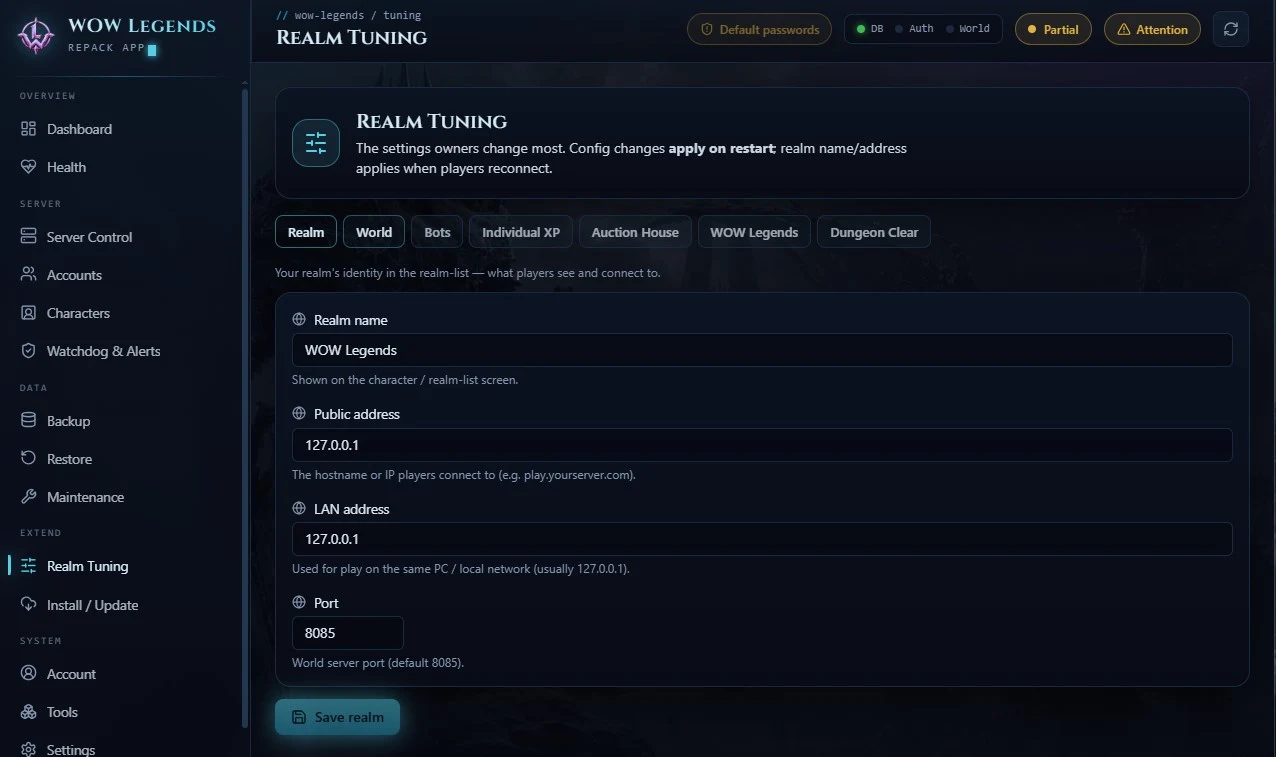
- ✓Without the App (manual): the same field lives in the auth database, table
realmlist. With HeidiSQL (or the mysql client) run the line below. LeavelocalAddressandport(8085) alone. Takes effect on reconnect.
UPDATE realmlist SET address = 'YOUR.PUBLIC.IP' WHERE id = 1;
Step 2 — Forward two ports in your router to this PC.
Your router blocks incoming connections by default. Open (forward) exactly these two, both TCP, pointed
at the PC running the server:
- ✓3724 — login server (the client's first stop)
- ✓8085 — world server (the actual game)
Every router UI is different — search “your router model port forwarding”. You'll
typically enter the port, the protocol (TCP) and this PC's LAN IP (see ipconfig, usually
192.168.x.x).
Tip: give this PC a static LAN IP (or a DHCP reservation) so the forwarding doesn't break when the router reboots.
Step 3 — Let it through Windows Firewall.
The first time authserver.exe / worldserver.exe run, Windows usually asks —
click Allow. If you never saw the prompt: Windows Security → Firewall & network protection →
Allow an app, and add both exes.
Step 4 — Your friend points their client at you.
In their WoW folder they edit Data\enUS\realmlist.wtf (one line):
set realmlist YOUR.PUBLIC.IP
Step 5 — Give them an account.
- ✓App: Accounts tab → create account, send them the login.
- ✓Manual: from the worldserver console:
account create FRIENDNAME PASSWORD - ✓Or host the optional registration website and they sign up themselves.
That's it — they log in and appear on your realm.
Case B — friend on your LAN (same wifi/house)
No port forwarding, no public IP. Just:
- Find this PC's LAN IP:
ipconfig→ usually192.168.x.x. - Put that IP in the LAN address field (App: Realm Tuning → Realm; manual: the
localAddresscolumn ofrealmlist). - Friend's
realmlist.wtf:set realmlist 192.168.x.x(your actual LAN IP). - Account as in step 5 above. Done.
Troubleshooting
- ✓“Unable to connect” at the login screen — port 3724 isn't reaching your PC (forwarding wrong, firewall, or wrong IP in their realmlist).
- ✓Logs in, sees the realm, but gets stuck/disconnected entering the world — the realm's public address is still wrong (step 1) or port 8085 isn't forwarded. This split is the classic symptom: login uses 3724, the world uses 8085 + the address from the realm list.
- ✓Worked yesterday, dead today — home connections change public IP. Check your IP again; a free dynamic-DNS name (e.g. DuckDNS) gives you a permanent hostname — put that in step 1 and 4 instead of the raw IP.
- ✓Everything is right and it still won't connect from outside — some ISPs put you behind carrier-grade NAT (no real public IP). Symptoms: the IP shown by “what is my IP” doesn't match what your router shows as its WAN address. Options: ask the ISP for a public IP, or use a tunnel (playit.gg, Tailscale + friend on the tailnet).
Security note important
Forward only 3724 and 8085. Never expose the database (3306), Remote Access
(3444) or SOAP (7878) to the internet — those are for you, not for players.
And before anyone joins: change the default passwords (App: Dashboard → Secure your accounts
— one click; manual: in-game as GM, same for AHBOT and WLSHOP):
.account set password ADMIN NewPass NewPass
Two ports, one address, one account — and your world has company. See you out there.